Real-Time 3D Scene Reconstruction using NVIDIA Isaac ROS Nvblox in Simulation and Reality
Published:
Originally published on Medium in October 2023. Reproduced here in full.
Authors: Dhruv Mehta, PhD, Chinmay Samak (PhD Student), Tanmay Samak (PhD Student)
Advisor: Dr. Venkat Krovi (Michelin Endowed SmartState Chair Professor of Vehicle Automation)
Affiliation: ARMLab, Department of Automotive Engineering, Clemson University International Center for Automotive Research (CU-ICAR), Greenville, SC 29607, USA.
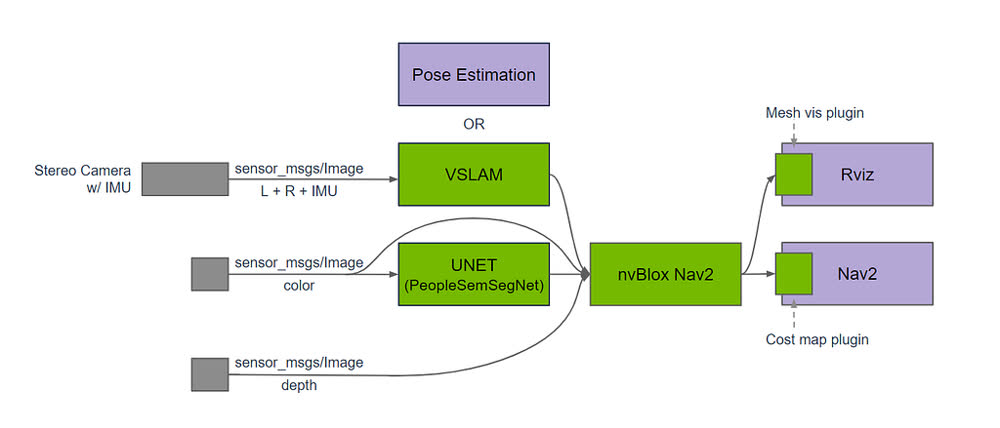 Source: NVIDIA-ISAAC-ROS/isaac_ros_nvblox
Simulation and reality are two facets of the same coin, which aid in prototyping, simulating, validating, and deploying autonomous mobile robots. One of the critical challenges in robotics is perception and navigation, where robots need to understand and navigate the complex 3D world around them. This article will explore an exciting combination of contemporaneous technology: the NVIDIA Isaac ROS Nvblox hardware accelerated 3D scene reconstruction packages for the Nav2 stack with ROS 2.
We show that the scene reconstruction pipeline is agnostic to the robot platform using an NVIDIA Carter in simulation and a ROBOTIS TurtleBot3 in reality to perform 3D reconstruction of the same scene, the VEX AI arena.
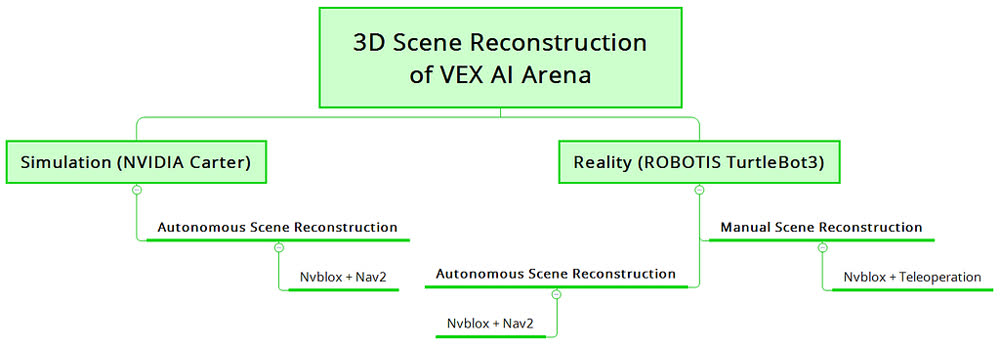
This article is organized as depicted in the figure above. In Part 1, we show a Carter robot autonomously operating in a scaled VEX AI arena while reconstructing its environment. Part 2 explains our hardware implementation using TurtleBot3 and Intel RealSense depth camera for manual as well as autonomous scene reconstruction. By combining Nvblox with the Nav2 stack using NVIDIA Isaac ROS Nvblox, we demonstrate that the robot can navigate an arena created using a VEX Robotics field while performing real-time 3D scene reconstruction as a vision-based motion planning solution to avoid obstacles.
Part 1: Simulation in NVIDIA Isaac Sim
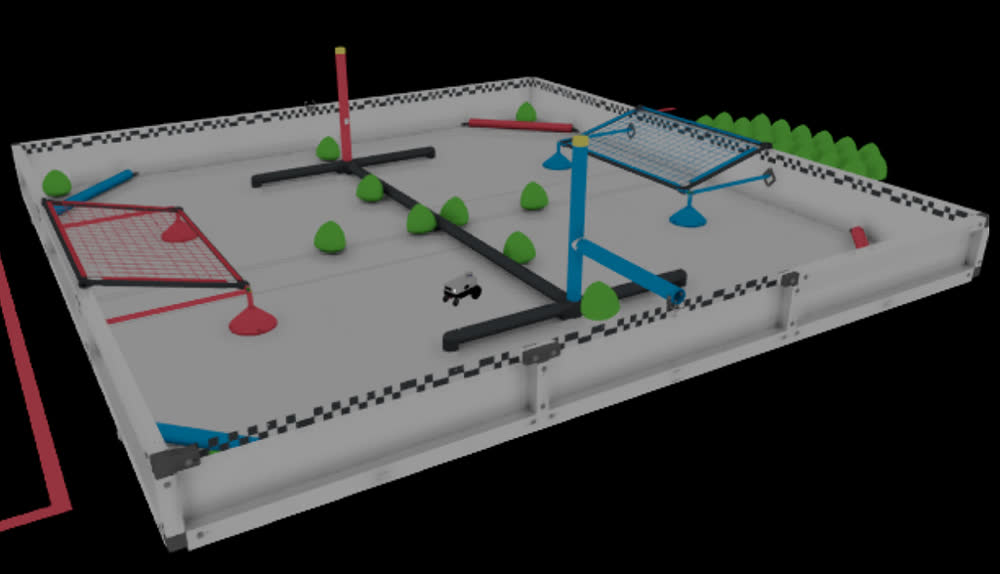 VEX AI arena in Isaac Sim
Like any other robotic system, testing algorithms in simulation first before deploying them on hardware is more effortless. We test the simulation with our custom-created field from VEX AI.
Requirements:
- OS: Ubuntu 22.04 LTS with ROS 2 Humble.
- Isaac Sim installation (minimum GeForce RTX 2070 required with 32 GB RAM).
Steps:
Install the Isaac ROS Nvblox package. The setup instructions can be found here. Please ensure you follow all the steps, especially the quickstart guide.
Then launch the Docker container and Nvblox package using the following commands:
cd ~/workspaces/isaac_ros-dev/src/isaac_ros_common && \
  ./scripts/run_dev.sh
cd /workspaces/isaac_ros-dev && \
  colcon build --symlink-install && \
  source install/setup.bash
- Start Isaac Sim with the Carter ROS warehouse scenario:
alias omni_python='~/.local/share/ov/pkg/isaac_sim-2022.2.1/python.sh'
omni_python ~/workspaces/isaac_ros-dev/src/isaac_ros_nvblox/nvblox_examples/nvblox_isaac_sim/omniverse_scripts/start_isaac_sim.py
- Launch the pre-composed graph launch file:
ros2 launch nvblox_examples_bringup isaac_sim_example.launch.py
You can drag and drop the VEX AI arena from the USD file here.
Click on the 2D Goal Pose button in RViz to navigate the robot. We’ve scaled the arena in order to create a similar scenario with the TurtleBot implementation. You can keep the same scale as per the robot used in Isaac Sim.
Results for simulation in Isaac Sim:
Part 2: Experiments in the real world
We tested the Isaac ROS Nvblox packages (ROS 2 Humble) on a TurtleBot3 Burger (running ROS 2 Foxy) with an Intel RealSense depth camera. Following are the details.
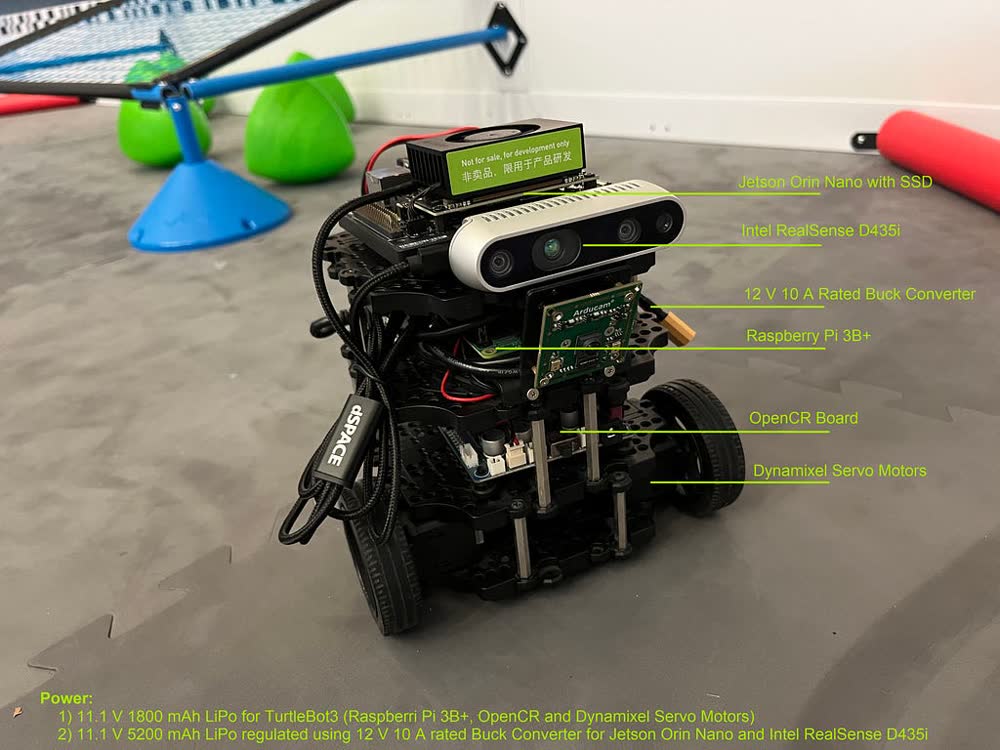 Hardware setup for running Isaac ROS Nvblox with TurtleBot3
Requirements, robot:
- TurtleBot3 Burger robot hardware with TurtleBot3 SBC image (tested with ROS 2 Foxy Fitzroy).
- TurtleBot3 packages.
Requirements, depth camera:
- Intel RealSense D435i or any other compatible version highlighted here.
- Intel RealSense firmware (tested with release 5.13, FW version 5.13.0.50, SDK version 2.52.1).
Requirements, Jetson Orin Nano:
- Jetson Orin Nano Developer Kit.
- NVIDIA JetPack SDK, tested with JetPack 5.1.2 using both the SD card image and the NVIDIA SDK Manager methods; the latter is smoother and reflashes the QSPI, which can help with boot issues.
- A PCIe SSD as optional storage.
- Isaac ROS development environment.
- Isaac ROS Nvblox.
- Isaac ROS RealSense (compatible with selective devices, tested with the Intel RealSense D435i).
- Isaac ROS Visual SLAM and Isaac ROS NITROS for hardware-accelerated RealSense camera-based reconstruction.
- VNC server (tested with x11vnc).
Requirements, remote PC:
- ROS 2 Foxy Fitzroy on Ubuntu 20.04 Focal Fossa.
- A VNC client (tested with VNC Viewer).
Setup instructions
Set up the TurtleBot3 robot by referring to the official instructions (we tested with ROS 2 Foxy). The exact ROS 2 packages for TurtleBot3 that we used are available here. Note that LIDAR is not required for this project, so any hardware or software setup pertaining to the LIDAR can be skipped. If you have a pre-assembled robot, you must dismantle the LIDAR unit (the USB2LDS interface board and related software packages may be left untouched, since their presence or absence will not affect this project). Verify that you can remote-SSH into the robot and teleoperate it from a remote PC.
Additional physical assembly includes mounting the Jetson Orin Nano Developer Kit (with PCIe SSD installed) and the RealSense D435i depth camera module (flashed with firmware 5.13.0.50) on the top “waffle plate” of the robot. Connect the camera to the Jetson using a USB A-C cable. A battery pack rated 9–24 V capable of delivering 15 W continuously to the Orin Nano (we used an 11.1 V 5000 mAh LiPo) should be assembled between the first (base) and second waffle plates and hooked up to the input of a DC-DC buck converter (we used a 12 V 10 A adjustable CC-CV buck converter) mounted on the second waffle plate beside the TurtleBot3 SBC (a Raspberry Pi), to ensure stable power delivery. The buck converter output (9–20 V) connects to the female barrel DC jack on the Jetson Orin Nano.
Flash the Jetson Orin Nano Developer Kit’s SD card using the conventional image method or the SDK Manager. We were successful with the SD card method, so the remainder of this article follows that approach (also available here).
Once the board boots and functions properly, set up the SSD as optional storage as instructed here.
Set up the Isaac ROS development environment as described here.
Install Isaac ROS Nvblox as instructed here.
Perform the Isaac ROS RealSense setup as indicated here.
Download and install Isaac ROS Visual SLAM and Isaac ROS NITROS, as mentioned here.
Manual teleoperation
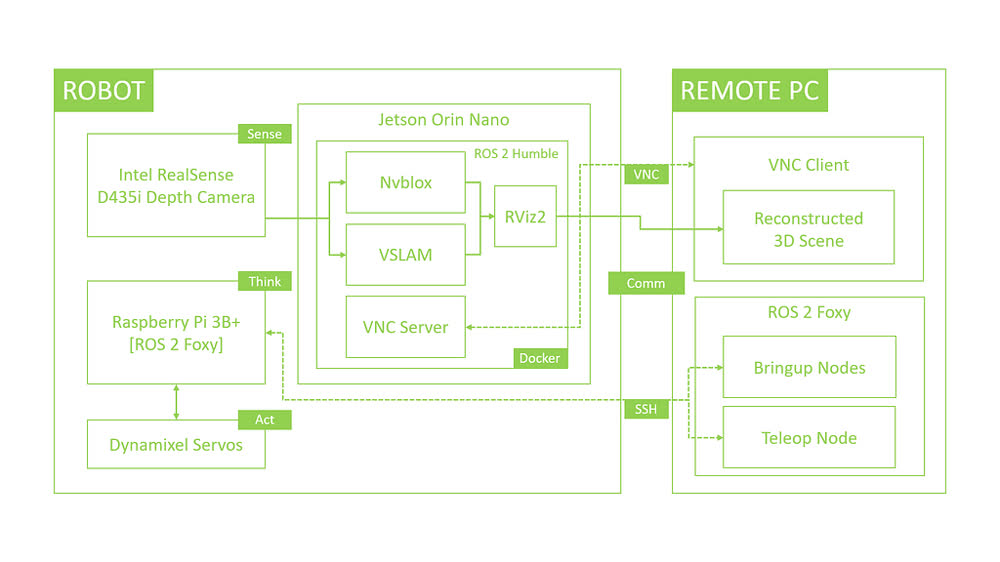 Manual scene reconstruction schematic
Turn the TurtleBot3 on and boot the Jetson Orin Nano and remote PC.
Open a terminal on the remote PC, remote-SSH into the TurtleBot3 SBC, export the TurtleBot3 model as an environment variable and bring up the necessary nodes:
user@remotepc:~$ sudo ssh <username>@<ip.address.of.turtlebot3>
user@turtlebot:~$ export TURTLEBOT3_MODEL=burger
user@turtlebot:~$ ros2 launch turtlebot3_bringup robot.launch.py
- Open another terminal, remote-SSH into the SBC and launch the teleoperation node (this terminal window must stay actively selected for teleoperation to work):
user@remotepc:~$ sudo ssh <username>@<ip.address.of.turtlebot3>
user@turtlebot:~$ ros2 run turtlebot3_teleop teleop_keyboard
Use a VNC client to connect to the VNC server running on the Jetson Orin Nano.
Launch the Docker container using the
run_dev.shscript. TheISAAC_ROS_WSenvironment variable takes care of the correct path depending on the SD card or SSD setup. This step requires internet access to build and launch the container properly:
user@jetson:~$ cd ${ISAAC_ROS_WS}/src/isaac_ros_common && ./scripts/run_dev.sh ${ISAAC_ROS_WS}
- Inside the container, build and source the workspace:
user@docker:~$ cd /workspaces/isaac_ros-dev && colcon build --symlink-install && source install/setup.bash
- Launch
realsense_exampleto begin real-time 3D scene reconstruction:
user@docker:~$ ros2 launch nvblox_examples_bringup realsense_example.launch.py
Teleoperate the robot to move around and reconstruct its surroundings. The following video shows an end-to-end demonstration of the robot performing real-time 3D scene reconstruction while being remotely teleoperated.
Autonomous navigation
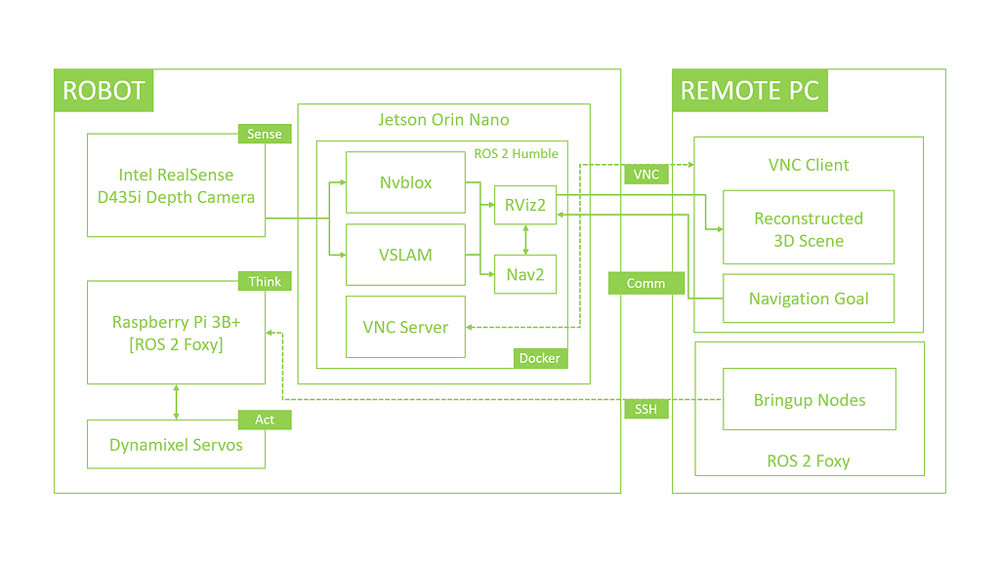 Autonomous scene reconstruction schematic
Turn the TurtleBot3 on and boot the Jetson Orin Nano and remote PC.
Open a terminal on the remote PC, remote-SSH into the TurtleBot3 SBC, export the TurtleBot3 model and the ROS domain ID, and bring up the necessary nodes:
user@remotepc:~$ sudo ssh <username>@<ip.address.of.turtlebot3>
user@turtlebot:~$ export TURTLEBOT3_MODEL=burger
user@turtlebot:~$ export ROS_DOMAIN_ID=22
user@turtlebot:~$ ros2 launch turtlebot3_bringup robot.launch.py
Use a VNC client to connect to the VNC server running on the Jetson Orin Nano.
Launch the Docker container using the
run_dev.shscript:
user@jetson:~$ cd ${ISAAC_ROS_WS}/src/isaac_ros_common && ./scripts/run_dev.sh ${ISAAC_ROS_WS}
- Inside the container, add the following files to the appropriate paths (these may be merged into the official repositories in future, but meanwhile these links will help):
nvblox_examples/nvblox_examples_bringup/launch/realsense_nav2_example.launch.pynvblox_examples/nvblox_examples_bringup/launch/nav2/nav2_realsense.launch.pynvblox_examples/nvblox_examples_bringup/config/nav2/nav2_realsense.yaml
- Build and source the workspace, and export the ROS domain ID (use the same ID as the TurtleBot3):
user@docker:~$ cd /workspaces/isaac_ros-dev && colcon build --symlink-install && source install/setup.bash
user@docker:~$ export ROS_DOMAIN_ID=22
- Launch
realsense_nav2_exampleto begin real-time 3D scene reconstruction in autonomous mode:
user@docker:~$ ros2 launch nvblox_examples_bringup realsense_nav2_example.launch.py
- Click the
2D Goal Posebutton in RViz, then click to command a target position and drag the green arrow to control target orientation in the reconstructed cost map. The robot navigates to the goal autonomously while continuing to reconstruct the scene live.
The following video shows an end-to-end demonstration of the robot performing real-time 3D scene reconstruction while autonomously navigating its environment.
Acknowledgement: Thanks to Aditya Krovi, Anish Ghana, Jacob Likins and Andrew Ko, undergraduate interns in ARMLab who helped set up the VEX AI arena both in Isaac Sim and in the real world.